Parallel agents
Run Claude Code and Codex in parallel with git worktrees
Use Yardsort to give Claude Code and Codex separate tasks, prepare their worktrees, review each diff and open two focused pull requests.
 yardsort
v0.20.2 · Linux · macOS · Windows · GPL-3.0
Open-source desktop for Claude Code, Codex and any CLI agent you already use. Parallel tasks get their own git worktrees; several agents can share one. Hand the work to the next agent with the context Yardsort already recorded — no re-explaining the branch.
$ brew install --cask joaoh82/yardsort/yardsortAll downloads · needs git and one agent CLI that already works in your terminal
Download the latest build from the Releases page. You also need git and at least one agent CLI that already works in your terminal. Yardsort does not bundle agents and never sees their credentials.
AppImage: chmod +x Yardsort_*.AppImage and run it. The AppImage updates itself; .deb and .rpm are told when a new version exists. Add it to your app menu.
yardsort-bin on the AUR — on its way. Until then the AppImage works on Arch.
$ brew install --cask joaoh82/yardsort/yardsortOpen the .dmg and drag Yardsort to Applications. The app updates itself.
Not code-signed yet, so SmartScreen warns: choose More info → Run anyway. Needs Git for Windows.
winget install joaoh82.Yardsort — awaiting Microsoft's review.
Prefer to build it yourself? git clone https://github.com/joaoh82/yardsort && cd yardsort && just setup && just build — see CONTRIBUTING.md.
Like a sorting yard: fan tasks onto parallel tracks, or keep several agents on one. Hand work from Claude to Codex without re-briefing the branch. Review each result before bringing the changes together.
01 · Workspaces
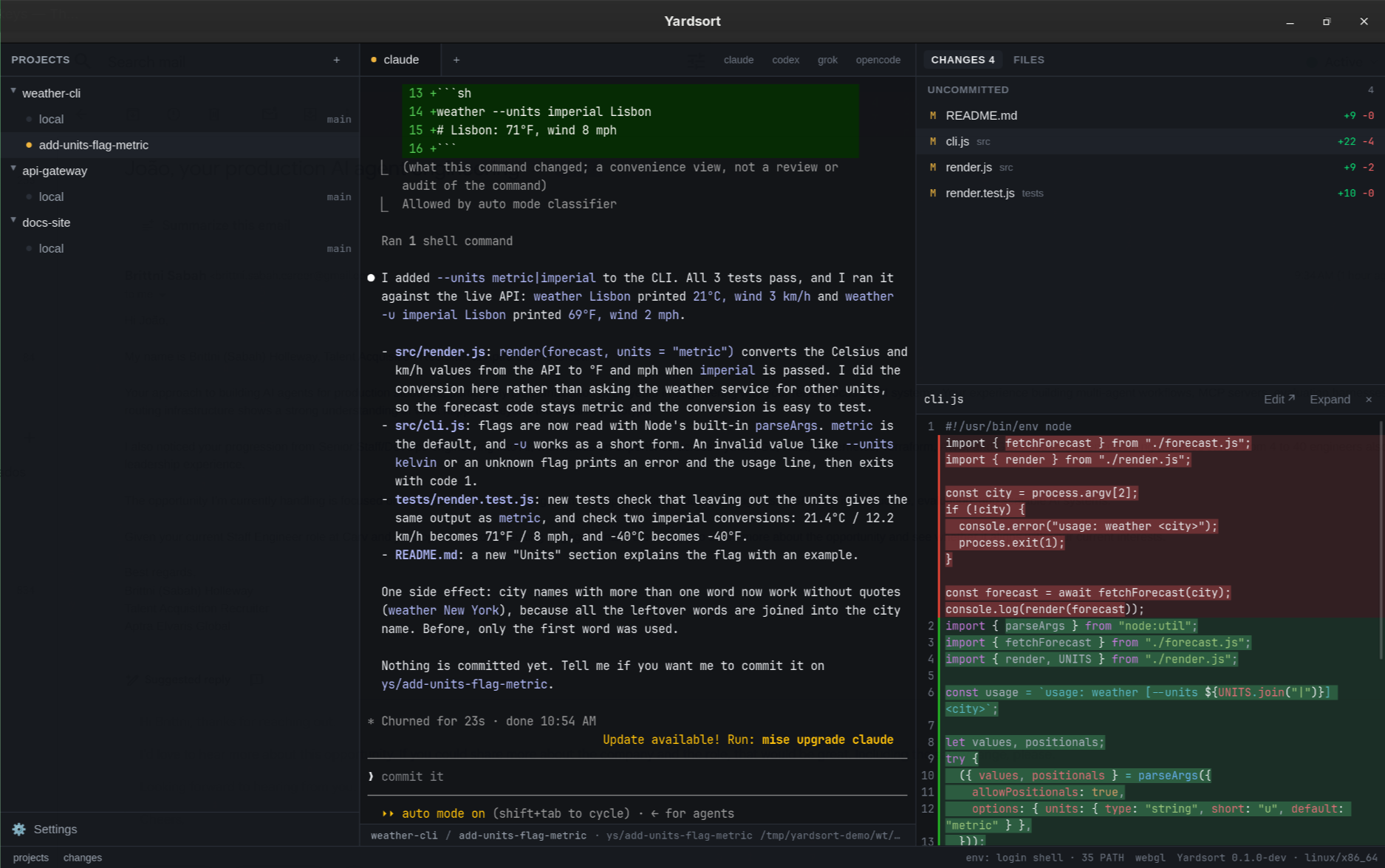
You describe a task, pick an agent, and press Enter. Yardsort creates a branch and a git worktree for it — a separate folder — and starts the agent there. Fan another task onto its own track, or start a second agent in the same worktree as a tab. Isolated when you need isolation; shared when you want Claude and Codex on the same files.
Workspaces are ordinary worktrees and branches. Inspect or undo anything with git. Worktrees made elsewhere can be imported, and never appear uninvited.
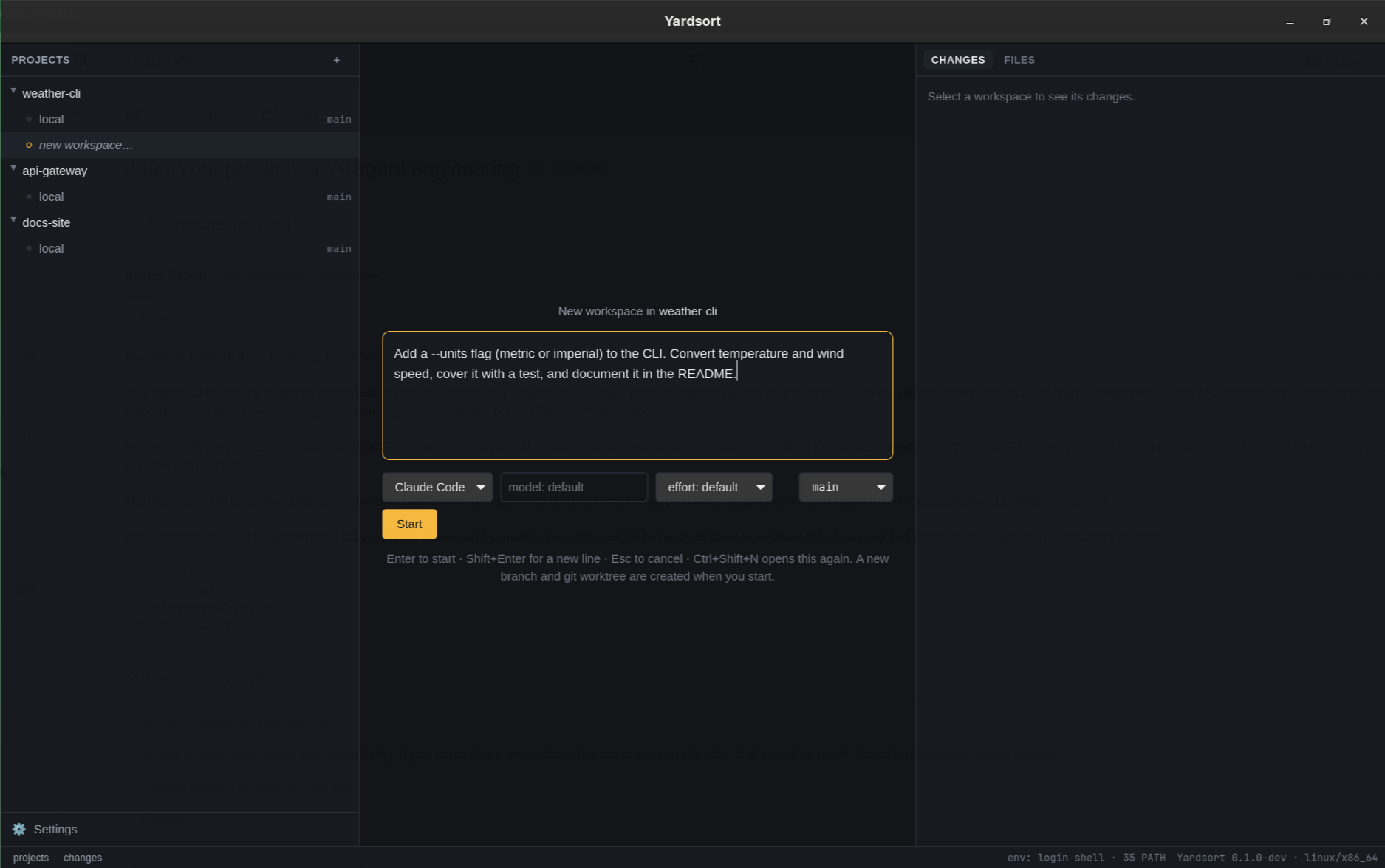
02 · Terminal
Agents run in a real PTY with their own interface. Whatever they can do in your terminal, they can do here — and Yardsort never parses their output.
Status dots show which agents are working and which are waiting; a desktop notification tells you when one finishes while you are elsewhere. A shell tab next to the agent is one Ctrl+Shift+T away.
03 · Changes
A live list of changed files, character-level diffs, a file tree and image previews. Edit text files here with retained drafts and a check before overwriting changes on disk, or open them in your editor.
When it looks right, the foot of the same panel commits it, pushes it and opens the pull request — whose number and check results then sit on the workspace row, with any other pull requests the workspace opened beside it. If it later conflicts with its base, the agent that opened it can be asked to resolve that. It stays an ordinary git branch throughout, and Yardsort holds no forge credentials: the gh you already use opens the pull request, or your browser does.
04 · Sessions
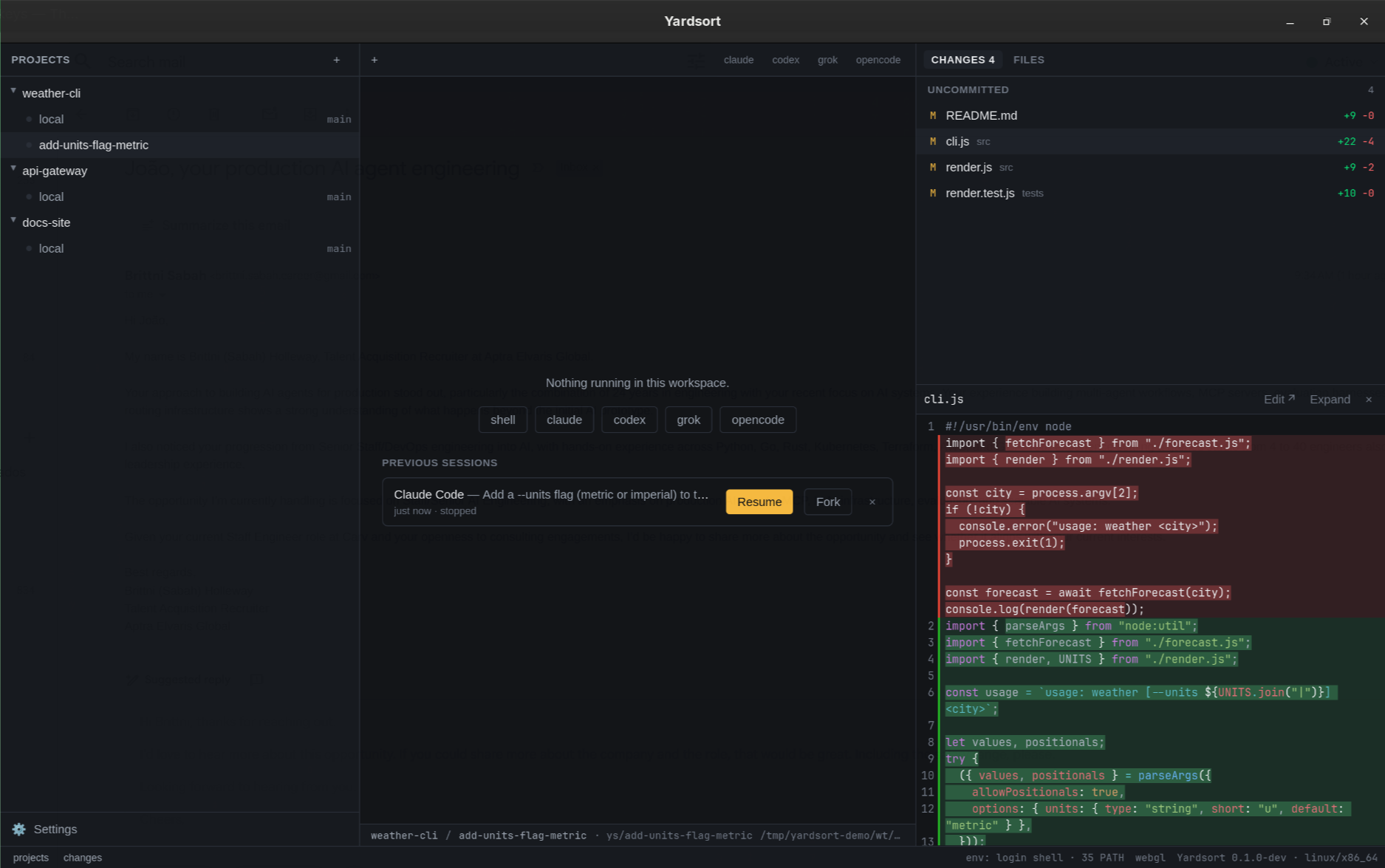
Close Yardsort and your agents carry on: the terminals belong to a small background process, not to the window. Open it again and every screen is repainted where it got to. Closing with work in flight asks first.
For a conversation that really did end, press Resume — it is intact. Fork one to try a different approach without losing the first.
05 · Handoff
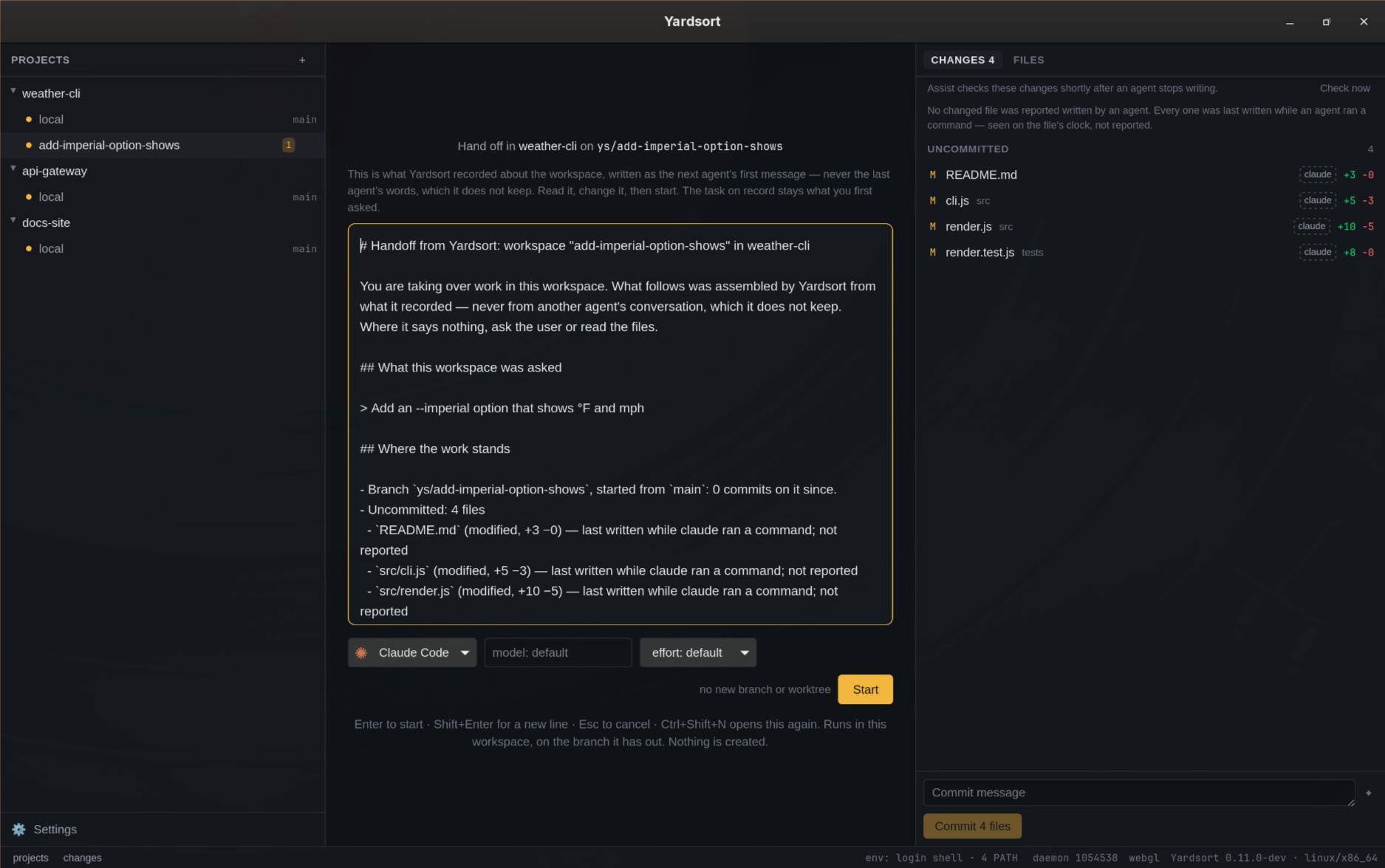
One agent has worked in a workspace and you want another there — Codex after Claude, or the same agent from a clean start. The files and the diff carry over by themselves. What was asked, tried and found does not — unless you hand it on. That is the usual pain of switching agents; Yardsort is built to close it.
Hand off… writes the next agent's first message from what Yardsort recorded: your task, word for word; the branch and its commits; each changed file and who wrote it; what every agent run did — its tools, what failed, what it wrote; and what is not known. It opens in the composer, where you read it, edit it, pick the agent and press Enter.
No model writes it, and Yardsort never keeps a conversation. In a project where you let the agents read each other's, it adds what was said — your messages and each turn's final reply, read from the agents' own transcripts when you press it. It says where it is blind, and tells the next agent to ask you. From a terminal, ys workspace handoff prints the same message.
A handoff shares the workspace. To build the next feature on this one in a worktree of its own, Fork into new workspace… makes a new branch from its branch and sends the same record after your message.
06 · Workflows
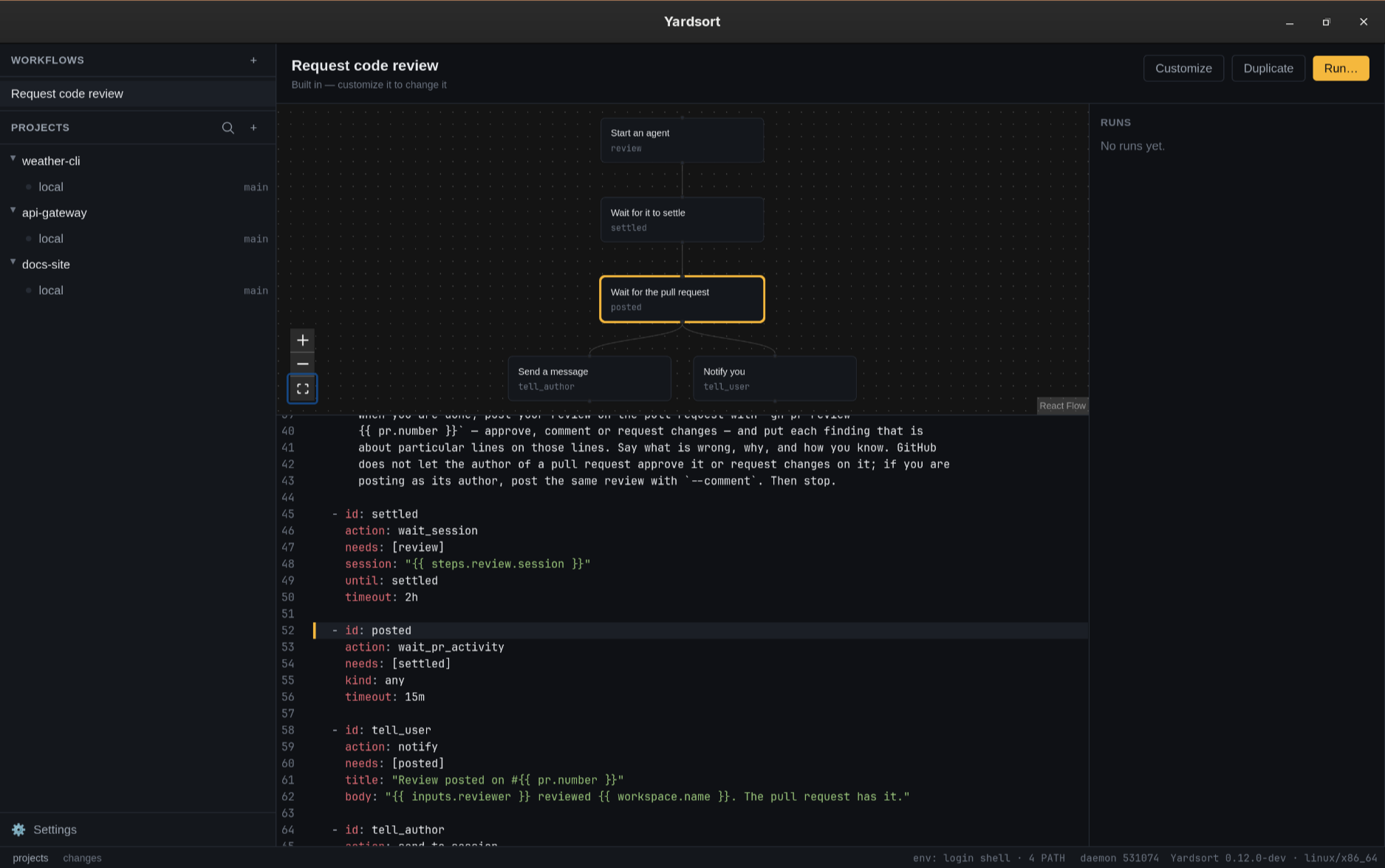
A workflow is a short YAML file: the inputs to ask for, and steps that start an agent, wait for it to settle, type to it once it is quiet, wait for a review on the pull request, and notify you. A step names the steps it needs, so the ones that need nothing of each other run side by side. Every name and every {{ variable }} is checked before anything runs, with the line and column of each mistake.
Workflows, above Projects, lists the built-in ones and yours: the steps as a chart, the file in an editor with every problem marked where it is, and the runs. Rather not write the file? Say what it should do and press Write it — the agent you already have, or your Anthropic key, writes it, checked like any other and never saved until you say so.
The built-in Request code review is in every workspace's menu: a second agent reviews the pull request in the same worktree and posts on GitHub, then you are told, and the agent that wrote it is told to address the review. ys workflow run does the same from a terminal, and the open app carries it out in the background.
Usage
Open Usage beside Settings in the sidebar, or from the command palette. Two tabs help you compare your agents and find which workspace is using CPU or memory. All figures stay on your machine, with no extra API key or activity capture needed.
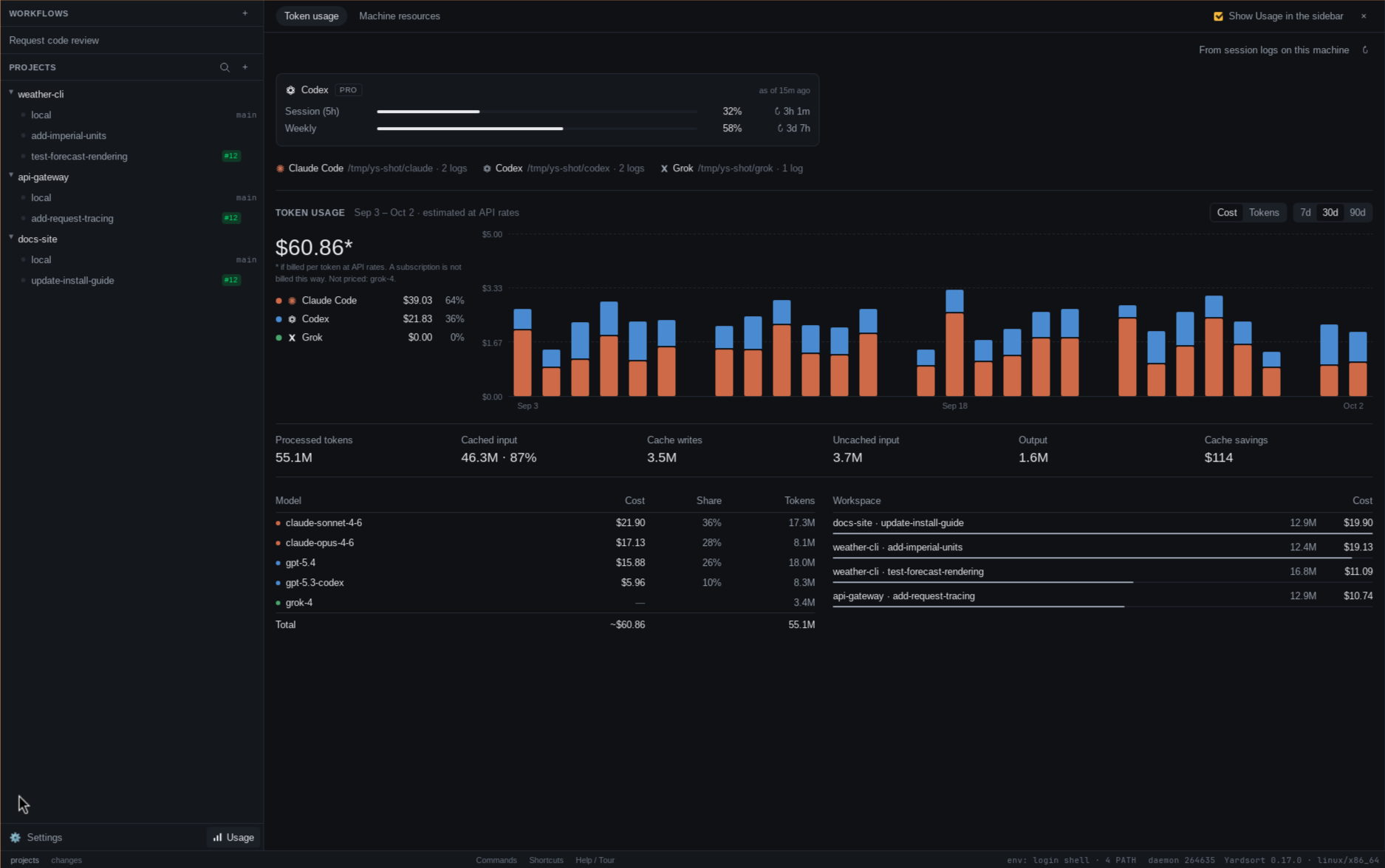
Compare Claude Code, Codex and Grok over 7, 30 or 90 days, by day, agent, model and workspace. Yardsort reads their local session logs, including conversations started outside the app. Inspect cache reads, writes and savings, and Codex's plan limits as it last reported them.
Switch between tokens and estimated API cost in US dollars. Cost is a comparison, rather than your subscription bill; unknown models, including Grok models, count toward tokens but have no cost estimate.
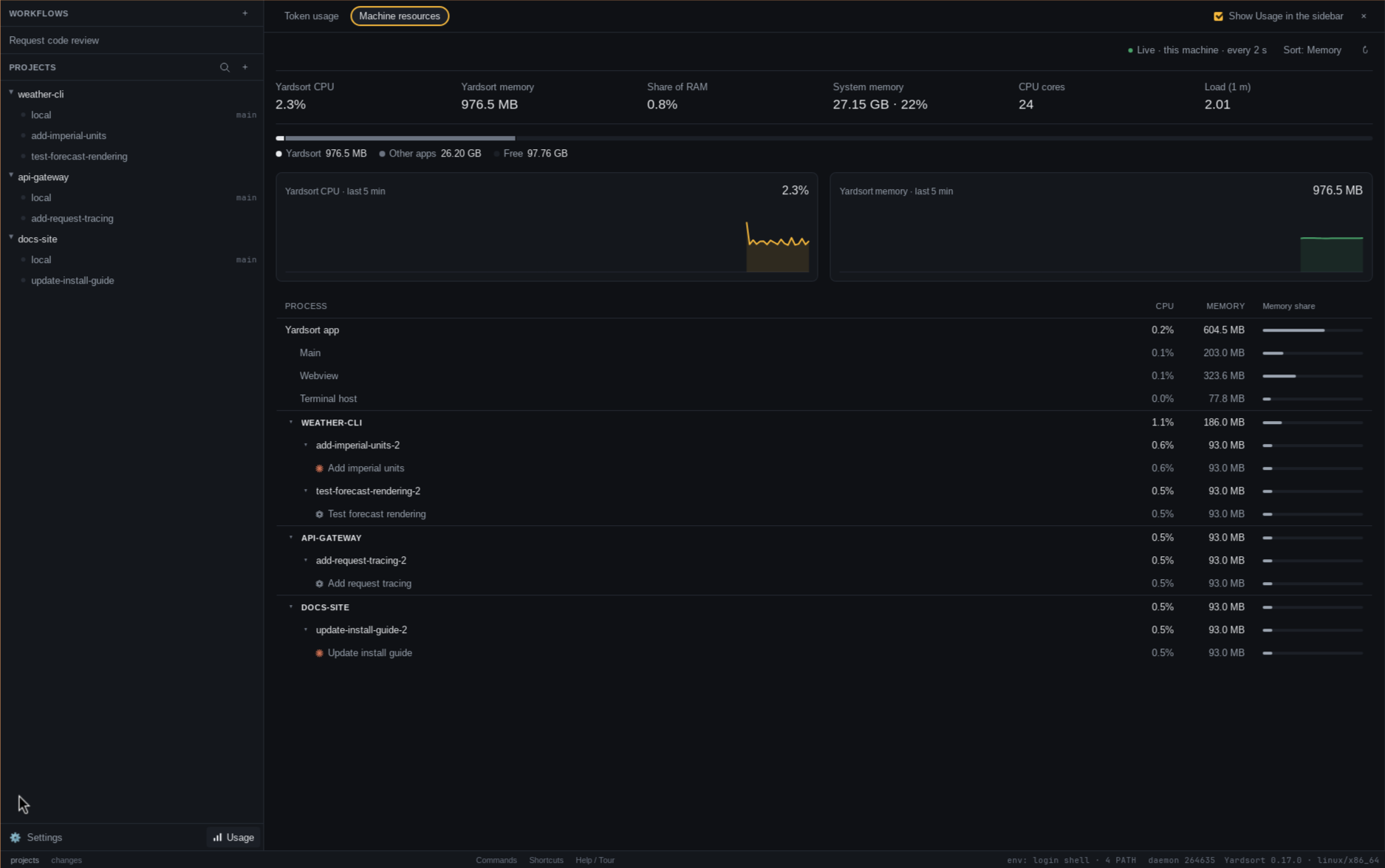
Follow live CPU and memory for Yardsort, its terminal host and every terminal it runs. Each terminal includes its agent and the programs it starts — builds, tests and language servers alike. This tab covers all agents, shells and run commands.
Sort by CPU or memory, expand projects and workspaces, and click a workspace to return to its terminal. Five-minute charts show recent samples; sampling runs every two seconds while this tab is open and the window is visible.
Token history covers logs still present on this computer. Neither tab includes other machines. Read the Usage guide →
07 · Command line
ys is a small command-line client that comes with the app, built from the same commit, and reads the same database — so each sees the other's work. Package installs put it on your PATH; elsewhere, one button in Settings does, and keeps it current.
The agent it starts belongs to the background process, not to the command — so it carries on after ys returns, and you can attach to it later, from a terminal or from the window.
The ys command line has every command.
$ ys workspace new yardsort "fix the flaky login test"branch, worktree and an agent, in one line$ ys attach fix-the-flaky-login-testput it back on your terminal; Ctrl-] detaches$ ys logs fix-the-flaky-login-testhow it ended up, as plain text — finished ones too$ ys workspace list --jsonevery command takes --json, for scripts$ ys workspace handoff fix-the-flaky-login-testthe next agent's first message, from what was recorded$ ys workspace fork fix-the-flaky-login-test "add a retry"the next feature on a new branch from that one, its record going along$ ys workflow run code-review --input reviewer=codexin a workspace's folder: a second agent reviews its pull request$ ys task list --needs-answerthe GitHub issues waiting on you — and ys task create files one$ ys test run loginrun a smoke test and read its verdict with ys test wait$ ys workspace delete fix-the-flaky-login-testthe folder goes; the branch staysWithout the app, it is also its own download in each release. Unpack it and put it on your PATH.
ys-0.20.2-linux-x86_64.tar.gzys-0.20.2-macos-universal.tar.gzys-0.20.2-windows-x86_64.zipOn macOS the standalone copy is unsigned up to 0.17.0, so one downloaded with a browser is refused: xattr -d com.apple.quarantine ys, or fetch it with curl. Later releases carry the signed, notarized copy from inside the app.
08 · Assist
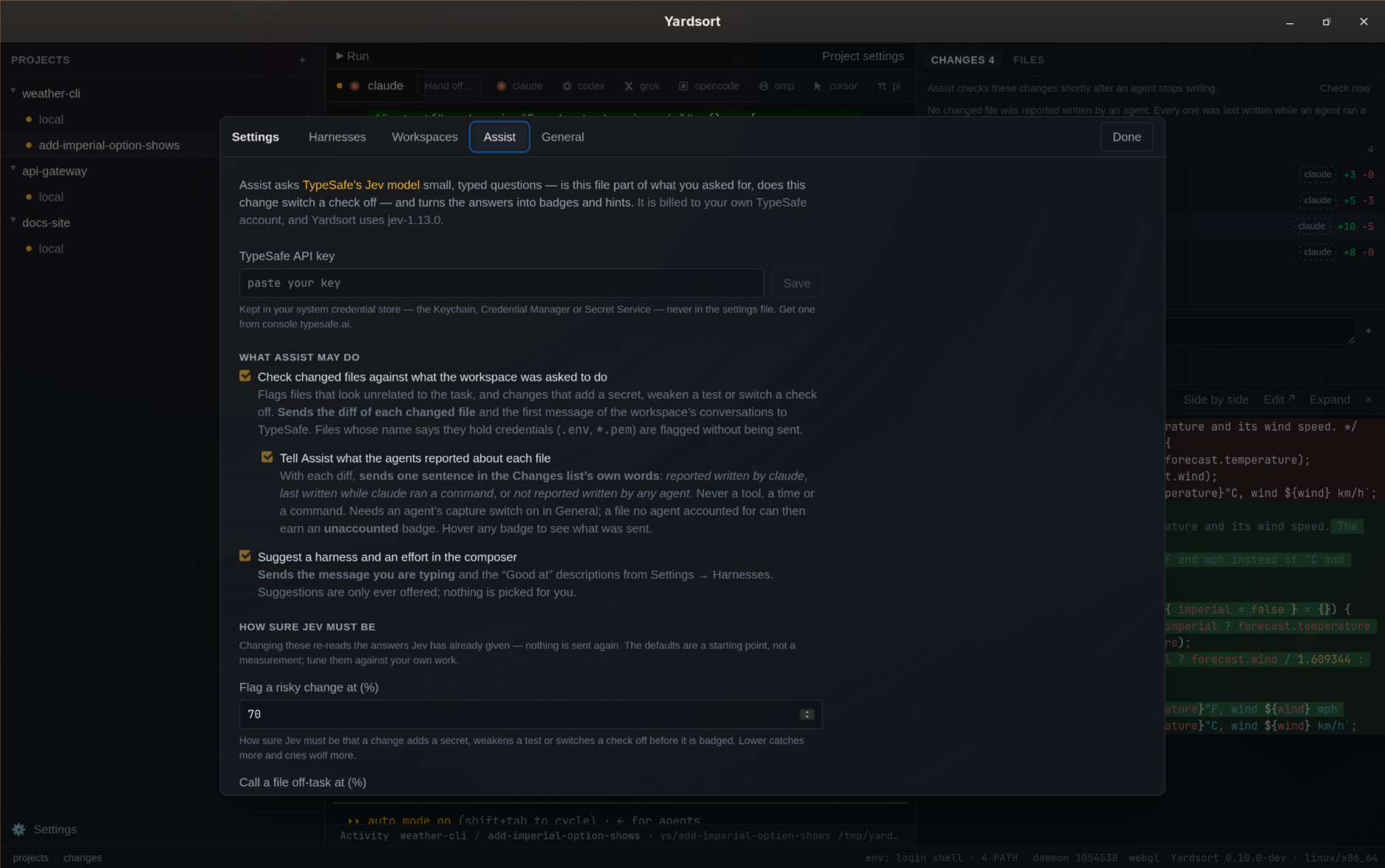
Yardsort never parses what an agent prints. A diff, though, is text a model can be asked about — so Assist asks Jev, TypeSafe's judgment model, about each changed file, and badges the ones worth a look.
Jev never generates text. It answers a typed question about a piece of state — a yes/no probability, a choice among named options, a position on ordered levels — and Yardsort decides what the number means. The questions stay narrow, one property each; the thresholds live in your settings; the model is pinned (jev-1.13.0) so a new version cannot move under them.
Switch on one more box and it is told who wrote each file, in the Changes list's own words — reported by an agent, written while one ran a command, or by nobody the record knows of. A substantive change no agent accounted for then earns its own badge, and every badge says what Assist was told.
In the composer it can also suggest a harness and an effort, built on your own “Good at” descriptions of your agents rather than on any opinion of ours. Nothing is ever picked for you.
Optional and off by default: it does nothing until you enter your own TypeSafe API key — kept in your system credential store, never in a file — and tick a feature. What leaves the machine is a changed file's diff and the task — plus, only with that box, the one sentence on who wrote it — or the message you are typing. Never a terminal. With no key, switched off or offline, Yardsort works exactly as it does otherwise, minus a few badges.
Assist covers the thresholds, the costs and what to do when TypeSafe says no.
09 · Harnesses
Claude Code, Codex, Grok, OpenCode, OMP, Cursor and Pi work out of the box. Orchestrate them on one task or across many — the worktree, the branch, the review of its changes and the pull request stay the same whichever you choose. Started in Claude, finish in Codex: hand off carries what happened so far, plus any project memory you approved.
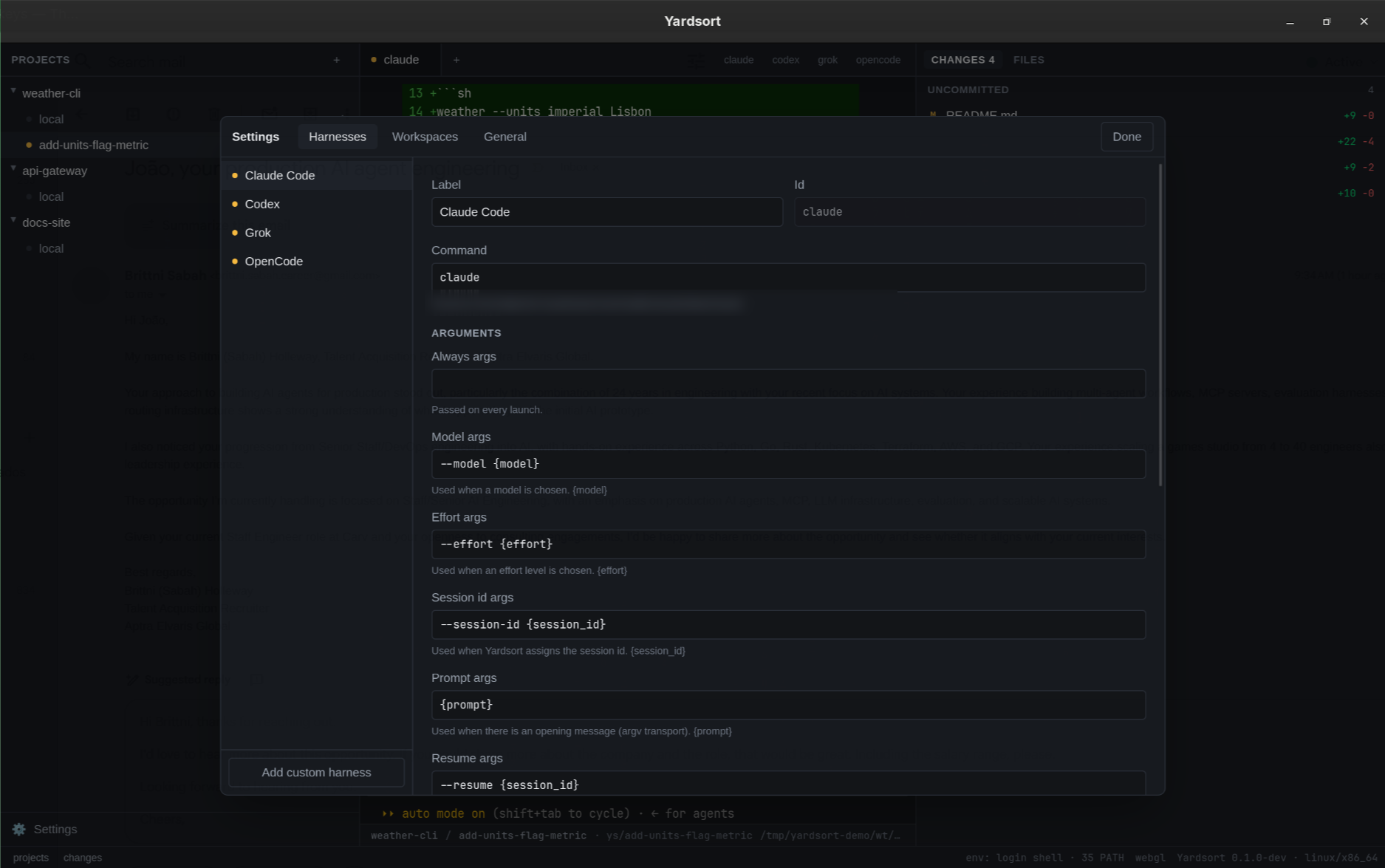
Add any other terminal agent with a few lines of configuration — no plugin, no release to wait for. To Yardsort a harness is a command and some argument templates, kept in a plain TOML file you can read, back up and edit. Its program is started with its own arguments, never through a shell, and uses its own login.
Settings & harnesses has every field, and how to set up --model, --resume and the rest.
Agent
claudecodexgrokopencodeompcursor-agentpiaidersettings.toml
[[harness]]
id = "aider"
label = "Aider"
command = "aider"
prompt_transport = "stdin"
10 · Also
Yardsort is an open-source desktop app for orchestrating coding agents on Linux, macOS and Windows. Parallel tasks get their own git worktrees; several agents can share one. Hand the work to the next agent with recorded context and project memory, then review changes and open pull requests from one place. Start with the quick start.
Yardsort runs on Linux, macOS and Windows. It has built-in configurations for Claude Code, Codex, Grok, OpenCode, OMP, Cursor and Pi. You can add other terminal agents with a custom harness.
Yardsort is free to download and use, with source code under the GPL-3.0 license. Agent subscriptions or API usage are separate: each agent uses your own account. Optional Assist requests are billed to your TypeSafe account.
Yes. Open Usage from the sidebar or command palette. Token usage reads Claude Code, Codex and Grok's local logs for the last 7, 30 or 90 days, including sessions started outside Yardsort. Compare agents, models and workspaces, inspect cache savings, and see Codex's last reported plan limits. API cost estimates are for comparison and do not represent your subscription bill; models with unknown prices still count toward tokens.
Machine resources shows CPU and memory for Yardsort and every terminal it runs, including each agent's child processes. It samples every two seconds while the tab is open and the window is visible. Both tabs stay local and need no extra key or activity capture. See Usage.
Yes. Install git and at least one coding agent CLI, and make sure the agent works in a fresh terminal before starting Yardsort. Yardsort does not bundle agents; they use their own login. The installation guide lists the prerequisites.
A git worktree checks out a branch in a separate folder. Yardsort gives each new task its own worktree, keeping that task's file changes apart from work in other workspaces. Agents started in the same workspace share its files. You still review changes and resolve any conflicts when merging branches. See workspaces and reviewing changes.
Yes, if you choose Leave them running when closing with agents still working. A local background process owns the terminals, and reopening Yardsort reconnects to them. Stop them ends the agents instead. This does not keep work running through a computer shutdown. See terminals and sessions.
Yardsort stores its project, workspace and session records on your computer. The coding agents you run can send prompts and code to their own providers under their own settings.
The Usage view reads the token counts the agents keep in their own logs on this machine, and the operating system's process figures; it sends nothing.
Optional Assist uses TypeSafe Jev. Depending on the features you enable, it sends changed-file diffs and task context, composer text and harness descriptions, or memory proposals and approved entries. Assist does not send terminal output. The Assist guide explains what each feature sends. Update checks and downloads also contact GitHub; see updates.
Parallel agents
Use Yardsort to give Claude Code and Codex separate tasks, prepare their worktrees, review each diff and open two focused pull requests.
Inside Yardsort
The decisions behind Yardsort: parallel coding on Linux, macOS and Windows, real agent terminals, and workspaces you can inspect with git.
GPL-3.0. You may use, study, share and change it, and versions you distribute must stay free under the same terms. The remote server is AGPL-3.0, so a changed copy run for others must offer them its source too.
Early, and moving fast. The core loop works on all three platforms and is covered by CI on each. Expect rough edges, and please report them.
joaoh82/yardsort★ 13